


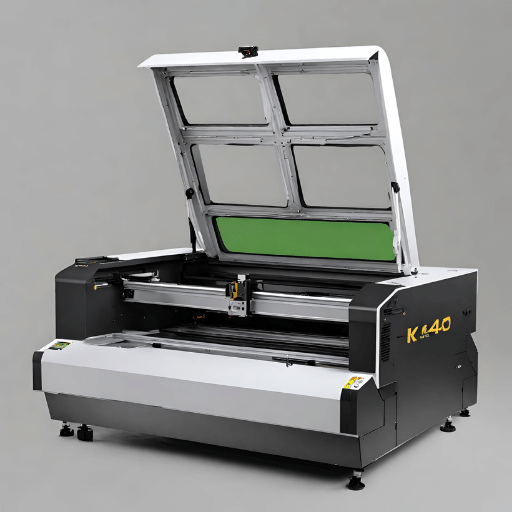
The K40 Laser Cutter, a popular choice among hobbyists and professionals alike, represents an affordable entry point into the world of laser cutting and engraving. Named for its 40-watt CO2 laser, the K40 is known for its compact size, making it an ideal choice for smaller workshops or home studios. Despite its lower power compared to industrial-grade models, it can proficiently cut and engrave a variety of materials, including wood, acrylic, and some metals, provided the proper adjustments and settings are applied. This guide will provide an in-depth look at the K40’s specifications, setup, operation, safety considerations, and optimization techniques to help users harness its full potential.
What is a K40 Laser Cutter and Engraver?

Understanding the Basics of K40 Laser Cutters
The K40 Laser Cutter operates on the principle of directing a high-power laser through optics. The machine, in its simplest form, consists of three main parts: the controller, the surface, and the laser. The 40W CO2 laser tube, as the primary component, emits a beam that is guided by mirrors and a lens to cut or engrave the desired material. The controller, typically a Digital Signal Processor (DSP) or an Arduino-based controller, directs the motion of these optics over the work surface. The work surface, often a honeycomb or a flatbed, holds the material in place during the cutting or engraving process.
The machine’s power, measured in watts, impacts its capabilities. With a 40W laser, the K40 can cut through materials up to 3-4mm thickness – typically wood, acrylic, or paper. For engraving, it can handle materials such as glass, ceramic, or coated metal. Understanding the limitations of your machine is crucial to successful operation and optimal results.
Technical Specifications of K40 Laser Engravers
K40 Laser Engravers are equipped with a 40W CO2 laser tube and are capable of cutting and engraving a diverse range of materials. The engraver operates within a 300x200mm working area and uses a 12V DC power supply. The laser tube has a wavelength of 10600nm, which is in the infrared part of the light spectrum, invisible to the human eye. The optimal operating temperature of the machine is between 20-25 degrees Celsius (68-77 degrees Fahrenheit), ensuring the longevity of the CO2 laser tube.
The K40 is versatile in terms of software compatibility as it supports various graphic formats, including HPGL, BMP, GIF, JPG, JPEG, DXF, DST, and AI. This covers most of the widely used design software such as CorelDraw, AutoCAD, and Adobe Illustrator. The engraver is also compatible with both Windows and macOS.
The machine’s overall dimensions are 800x500x250mm, making it a compact device suitable for small workshops or home-based enterprises.
Understanding these technical specifications is crucial for the optimal use of the K40 Laser Engraver and will allow users to maximize its potential in their respective applications.
Benefits of a 40W CO2 Laser
- Efficiency: 40W CO2 lasers deliver high energy efficiency, converting about 10-20% of the input power into actual laser power, leading to a lower operating cost in the long run.
- Versatility: These lasers are capable of effectively cutting and engraving a wide range of materials, including wood, acrylic, glass, ceramic, and coated metal. This makes them highly versatile for various applications.
- Precision: The CO2 laser’s accuracy allows for intricate designs, detailed engravings, and clean, sharp cuts. This precision is precious in industries such as jewelry making, woodworking, and sign making.
- Safety: When operated correctly, 40W CO2 lasers are safe to use. They are equipped with safety features like water cooling systems and exhaust fans to prevent overheating.
- Speed: These lasers work quickly, making them ideal for businesses that require high production rates.
- Ease of operation: With user-friendly interfaces and compatibility with various design software, these machines are relatively easy to use, even for beginners.
- Compact size: Given their overall compact dimensions, 40W CO2 laser machines are suitable for small workshops and home offices. They offer high-end performance without occupying too much space.
Working with a K40 Laser: Tips and Tricks

Setting Up Your Workpiece Correctly
The position and flatness of your workpiece significantly affect the quality of your cuts and engravings. Always ensure that your workpiece is flat and level within the machine’s work area before you begin your operation. Misalignment could result in lower precision and efficiency.
Understanding Power Settings and Speed
A common misconception among beginners is that higher power settings will always lead to better results. This is not necessarily true. The power and speed settings on your K40 Laser should be adjusted according to the material you are working with. For example, lower speed and higher power settings are ideal for thicker materials, while higher speeds and lower power settings are more suited to thinner, more delicate materials.
Regular Maintenance
The life expectancy and performance of your K40 Laser are mainly dependent on how well you maintain it. Regular cleaning, keeping the machines’ lenses and mirrors dust-free, and inspecting the water cooling systems are critical to ensure the machine’s longevity.
Safety First
Even though K40 lasers come with safety features, it’s essential to adhere to safety measures strictly. Always wear protective eyewear when the machine is in operation and never leave it unattended when it’s working.
By keeping these tips and tricks in mind, you can ensure optimal performance from your K40 Laser and improve the quality of your work.
Common Applications of K40 Laser Cutters

K40 laser cutters are incredibly versatile tools capable of executing a variety of tasks across numerous industries. Here are some of the most common applications:
- Engraving: K40 lasers are often used to engrave designs, text, or images on a wide range of materials, including wood, acrylic, glass, and more. This is particularly popular in the creation of personalized gifts, signage, and decorative items.
- Cutting: The K40 laser is a powerful tool for cutting materials such as paper, plastics, textiles, and thin wood. These capabilities make it a favorite among hobbyists and professionals in industries such as fashion, interior design, and model making.
- Prototyping: Due to its precision, the K40 laser cutter is a popular choice for creating prototypes. Whether it’s architectural models, product design mock-ups, or intricately detailed parts, the K40’s accuracy is invaluable.
- Industrial Manufacturing: In the industrial sector, K40 lasers are used for tasks like cutting components, engraving identification numbers, and creating templates.
- Educational Purposes: Many schools and universities employ K40 lasers in their workshops, allowing students to learn about and experiment with digital fabrication techniques.
Remember, the success of these applications largely depends on understanding the correct power settings, proper maintenance, and stringent safety measures.
How do you choose the suitable K40 Laser Cutter and Engraver?

Factors to Consider When Selecting a K40 Laser Cutter
- Power Output: Evaluate the power output of the K40 laser cutter. Higher power output allows it to cut through thicker materials more efficiently.
- Size of the Work Area: The size of the engraving/cutting area should be considered based on the projects you plan to undertake. More extensive work areas offer more flexibility for more significant projects.
- Software Compatibility: Check the software compatibility of the laser cutter. Some are compatible with all major design software, while others may only work with specific programs.
- Safety Features: Safety is paramount when operating a laser cutter. Consider devices with built-in safety features like water-cooling systems, ventilation fans, and emergency stop buttons.
- Support and Warranty: A good warranty and responsive customer support can be a lifesaver if you run into any issues with your machine.
- Ease of Assembly: Some laser cutters come fully assembled, while others require assembly. If you’re not mechanically inclined, opt for a machine that requires less assembly.
- Price: Finally, consider your budget. More expensive models often come with additional features and capabilities, but many affordable options still deliver high-quality results.
Upgrading Your K40 Laser Cutter and Engraver
With time and experience, you may find that you want to push the boundaries of what your K40 Laser Cutter and Engraver can do. Upgrading your machine is a viable option to enhance its performance and capabilities. Here are some potential upgrades to consider:
- Air Assist: Adding an air assist can significantly improve the cutting performance of your K40, reducing fflame-upsand helping to keep the cutting area clean.
- Improved Cooling System: Although most K40 units come with a basic water-cooling system, upgrading to a more extensive or more efficient system can provide better temperature control, extending the lifespan of your laser tube.
- Focus Lens Upgrade: A high-quality focus lens can enhance engraving and cutting precision. Look for a lens with a shorter focal length for finer detail in engraving.
- Improved Ventilation: Upgrading the exhaust system can help to remove fumes and debris from the cutting area more effectively, providing a safer and cleaner working environment.
- Control Board Upgrade: A new control board can provide better software compatibility, improved control over power settings, and smoother motor operation.
Always remember to follow safety guidelines and properly adjust power settings when installing upgrades to ensure optimal performance and longevity of your machine.
Optimizing the Laser’s Performance
To optimize your K40 Laser Cutter and Engraver’s performance, it is vital to consider several factors. First, ensure that the laser’s alignment is precise. This involves correctly aligning the laser tube, mirrors, and lens to make sure the laser beam follows a straight path, thereby maximizing its power and precision.
Secondly, control the temperature of your machine. A well-regulated cooling system can drastically improve the performance and lifespan of your laser tube. A temperature of around 20-25°C is typically ideal for operation.
Lastly, appropriate maintenance of your machine plays a vital role. Regularly clean your machine to remove any built-up debris that can interfere with your machine’s operation and potentially damage it. Also, periodically check and calibrate the mirrors and lens for any wear and tear.
Adopting these practices will help you make the most out of your K40 Laser Cutter and Engraver, ensuring consistent, high-quality performance.
Best Practices for Engraving and Cutting with a K40 Laser
- Material Selection: The first step for effective cutting or engraving is choosing a suitable material. Materials such as acrylic, wood, and paper are ideal for laser cutting and engraving. However, avoid materials like PVC, which release toxic fumes when laser cut.
- Correct Power Settings: The power settings should be adjusted according to the material used and the desired depth of the cut or engrave. Too much power can burn the material, while too little energy may not penetrate sufficiently.
- Focus the Laser Beam: Ensure the laser beam is focused correctly on the surface of the material. A poorly focused beam can result in less precise cuts or engravings and may cause unnecessary wear on the machine.
- Test Runs: Conducting test runs on scrap material before proceeding with the final piece can help fine-tune the settings, ensuring optimal results.
- Ventilation: Ensure adequate ventilation while the machine is operating to remove any fumes or dust created during the process, ensuring both the machine’s longevity and a safer working environment.
- Regular Maintenance: Regular cleaning and maintenance of the machine, lenses, and mirrors help maintain the accuracy of the machine over time, ensuring consistent results.
Using a K40 Laser for Small Business and DIY Projects
The K40 Laser Cutter and Engraver opens up a world of possibilities for small business owners and DIY enthusiasts alike. This versatile tool enables the creation of intricate designs on a variety of materials, offering an affordable solution for both prototyping and production. For small business owners, the K40 Laser can be utilized in sectors such as signage, personalized gifts, and jewelry design, allowing entrepreneurs to offer custom products to their customers.
DIY enthusiasts will find the K40 Laser equally helpful. It’s an excellent tool for crafting, model building, and even home improvement projects, where precision cuts and engravings can add a unique, personalized touch. The K40 Laser’s ability to work with a variety of materials and its ease of use makes it a valuable addition to any DIY workspace. Armed with this powerful tool, both small businesses and DIYers can transform their creative ideas into tangible reality with utmost precision and efficiency.
Working with a K40 Laser Cutter and Engraver
Mastering Acrylic Cutting and Engraving
When it comes to acrylic cutting and engraving with the K40 Laser Cutter and Engraver, mastering a few essential techniques can significantly enhance the quality and precision of your results. First, it is necessary to set the cutting speed and power correctly correctly. For acrylic, a lower power setting and slower speed typically yield cleaner cuts and engravings. Second, always ensure that the acrylic material is clean and free of dust before starting the process to prevent any obstructions that can affect the laser’s performance. Third, using the air assist feature can make a considerable difference by reducing heat and preventing the material from melting or catching fire. Lastly, considering the use of masking tape over the area to be engraved can help minimize heat marks, resulting in a more professional finish. By following these recommendations and persistently experimenting with different settings, one can genuinely master acrylic cutting and engraving with the K40 Laser.
Understanding the CO2 Laser Tube and Its Maintenance
The CO2 Laser Tube is the heart of the K40 Laser Cutter and Engraver. It is responsible for emitting a beam that cuts and engraves material with precision. Like any core component, it requires regular maintenance for optimal performance. This includes cleaning for dust and residue removal, monitoring for signs of wear and tear, and ensuring proper alignment. Regular inspections help extend its lifespan and maintain the efficiency of the laser cutter.
Importance of Air Assist and Cooling Systems

An integral part of the laser cutting process, the Air Assist and Cooling Systems play a pivotal role in ensuring the precision, safety, and longevity of the device. The Air Assist blows a steady stream of air at the cutting surface, preventing heat-induced damage and increasing cutting efficiency. The Cooling System, on the other hand, helps manage the heat generated during operation, preventing overheating and maintaining the stability of the CO2 Laser Tube.
Utilizing LightBurn Software for Laser Engraving
LightBurn, a powerful and intuitive laser engraving software, can elevate your K40 Laser Cutter usage. It offers a wide range of features enabling complex design creation, editing, and layer management. The software also allows real-time control over your laser, providing the ability to adjust settings on the fly and ensuring the best possible results for each project.
Ensuring Safety and Productivity with a K40 Laser
While the K40 Laser Cutter offers tremendous capability, it’s crucial to operate it safely. This includes wearing appropriate protective gear, ensuring proper ventilation during operation, and maintaining a clean and organized workspace. Regular maintenance, correct usage, and safety precautions can assure not only the longevity of your device but also a productive and hazard-free working environment.
Advanced Techniques and Applications

Exploring Engraving on a Variety of Materials
The K40 Laser Cutter offers the flexibility to engrave on a multitude of materials, each presenting unique characteristics and considerations.
- Wood: Ideal for engraving due to its natural fibrous structure, wood types like birch, maple, and cherry provide the best results. The laser power settings need careful adjustment as too much power can cause charring.
- Acrylic: This material is beautifully engraved with a glossy finish but requires lower power settings to avoid melting or distortion. Cast acrylic is preferable over extruded types as it produces a white, frosted engraving that contrasts nicely with the material.
- Glass: Laser engraving on glass can create stunning frosted designs. However, it’s a tricky process due to the risk of breakage from thermal shock. Coating the glass with a wet newspaper helps dissipate the heat evenly.
- Metals: While bare metals require a special marking compound for the laser to leave a permanent mark, coated metals, such as anodized aluminum, can be directly engraved by the laser.
Understanding the properties of each material and adjusting the laser settings accordingly is critical to achieving optimal engraving results.
Enhancing Precision and Speed in Laser Cutting
To enhance the precision and speed in laser cutting with the K40, it’s essential to understand the interplay between three primary factors: the power of the laser, the speed of cutting, and the focus of the laser beam.
- Laser Power: This is the energy output of the laser. Higher power results in faster and deeper cuts, but excessive power can lead to the melting or burning of the material. It’s crucial to find a balance that yields clean cuts without damaging the material.
- Cutting Speed: This is the pace at which the laser moves across the material. Faster speeds lead to quicker cuts but may result in less precision or incomplete cuts. Slower speeds can produce exact cuts but at the risk of burning the material, especially when combined with high laser power.
- Laser Focus: The focus of the laser beam affects the precision of the cuts. A perfectly focused laser will produce the sharpest and most accurate cuts. If the laser is out of focus, the accuracy decreases, and the cutting process may take longer.
Therefore, optimizing these settings for the material you are using is critical. Experimentation and practice will lead to finding the perfect balance for each material. Remember, safety should always be the priority when operating the K40 Laser Cutter. Always wear appropriate safety gear and follow the manufacturer’s instructions.
Customizing Your Laser Engraver Machine with Add-Ons
Customizing your K40 Laser Engraver Machine can significantly enhance its functionality and performance. Several add-ons can be integrated depending on your specific requirements:
- Air Assist: Installing an air assist can help reduce the risk of flammable materials catching fire. It expels a steady stream of air at the point of engraving, clearing away excess heat and combustible gases.
- Improved Ventilation: Upgrading the extractor fan or adding an external vent can improve workspace conditions by efficiently removing smoke and fumes produced during the engraving process.
- Additional Cooling: A more efficient cooling system can prevent overheating, prolonging the lifespan of the laser tube. Water chillers are a popular choice for this.
- Upgraded Lens and Mirrors: Higher quality lenses and mirrors can improve the focus and intensity of the laser beam, thereby increasing precision and cutting power.
- Rotary Attachment: A rotary attachment allows engraving on cylindrical objects, expanding the range of materials you can work with.
Before making these modifications, it’s essential to consider your needs and the safety implications carefully. Always ensure that any mchangescomply with the manufacturer’s guidelines and local safety regulations.
Creating Intricate Designs with Honeycomb Cutting Beds
Honeycomb cutting beds offer a versatile solution for creating intricate designs with your laser engraver machine. The honeycomb structure provides support for materials of all sizes, allowing for accurate and detailed cuts. Additionally, the open design of the honeycomb bed minimizes contact with the material, reducing the risk of heat damage and allowing waste material to fall through during the engraving process. This feature is particularly beneficial when working with delicate materials such as fabric or thin plastic. For optimal results, ensure the material is flat against the honeycomb surface and that the machine’s settings are correctly adjusted for the material type and thickness. Regular cleaning of the honeycomb bed is also essential to maintain performance and longevity.
Innovative Uses of a K40 Laser Cutter for Art and Design
The K40 laser cutter has emerged as a go-to tool in the art and design field due to its versatility and affordability. It offers substantial opportunities for innovation in several areas:
- Jewelry Design: MThe micro-engravingcapabilities of the K40 allow jewelry designers to create intricate patterns and personalized pieces with precise detail.
- Architectural Models: The precision and consistency of the K40 make it ideal for fabricating complex architectural models, providing architects with a tangible way to conceptualize and present their designs.
- Fabric Art: By adjusting intensity and speed, artists can use the K40 to create unique designs on delicate materials like fabric, adding a new dimension to textile arts.
- Wood Inlays: The K40 can be used to cut out intricate shapes for wood inlays, providing a level of detail that can be challenging to achieve by hand.
- Stenciling: Artists and designers can leverage the K40 to produce elaborate stencil designs for applications like street art or screen printing.
To ensure quality results, continually optimize settings such as speed, power, and resolution based on the material being used. Regular maintenance of the K40 machine and accessories is also crucial in preserving its performance. Always remember that safety is paramount; always adhere to the manufacturer’s guidelines and local safety regulations.
References
List of Ten Relevant and Reliable Sources on K40 Laser Cutters and Engravers:
- “K40 Laser Cutters: All You Need to Know” – This article from All3DP provides an overview of the OMTech 40-W Laser Engraver, one of the most popular K40 laser cutters on the market. It includes specifications and features to consider when buying a K40 laser cutter. Source
- “K40 Laser Cutters: The Essential Guide” – Clever Creations offers an essential guide to buying a 40W laser engraver/cutter. It covers crucial factors to consider, such as safety features, software compatibility, and materials that can be cut or engraved. Source
- “The Complete Idiots Guide to Chinese ‘K40’ Laser Cutters” – This blog post from Wargaming3D provides information on the SUNCOO K40 Laser Engraver, a DIY engraving machine suitable for wood, glass, and acrylic. It discusses features like the CO2 laser and USB connectivity. Source
- “K40 Laser Cutter: Complete Guide [2023]” – Mellowpine offers a comprehensive guide to the Monport laser engraver, which employs a 40W CO2 laser tube. The guide provides details on its capabilities, dimensions, and application areas for cutting and engraving. Source
- “Buyers Guide to the Chinese K40 Laser Cutter” – The K40.se website provides a detailed buyer’s guide for the famous K40 laser cutter engraver. It covers various types of machines, potential concerns, and things to watch out for when purchasing a K40 laser cutter. Source
- “Beginners Guide To The K40 Laser Engraver” – Monport’s blog post offers a beginner’s guide to the K40 laser engraver. It explains the basics of CO2 lasers and heir applications in cutting and engraving and provides insights into the Monport K40 machine. Source
- “Laser Noob: Getting Started With The K40 Laser” – Hackaday’s article serves as a beginner’s guide to the K40 laser cutter. It discusses the importance of understanding the limitations of the machine, as well as tips and tricks for cutting and engraving. Source
- “40W Laser Engraver & Cutter Review (K40)” – Make or Break Shop provides a review of the K40 laser engraver and cutter, highlighting its popularity in the budget CO2 laser market. The review focuses on price, power, and user experience. Source
- Manufacturer Website – OMTech – Visit the official website of OMTech, the manufacturer of the popular 40-W Laser Engraver, to obtain detailed information about the product’s specifications, features, and available accessories. Source
- Manufacturer Website – Monport Laser – Explore the Monport Laser website to learn more about their 40W CO2 laser engraver, including its technical specifications, capabilities, and applications. Source
Recommend reading: Get the Best Co2 Laser Cutter from Dekcel!
Frequently Asked Questions (FAQs)

Q: What are some key features of a 40W CO2 laser cutter engraver?
A: A typical 40W CO2 laser cutter engraver – like the Monport 40W or desktop laser models – is equipped with a 40W CO2 laser tube capable of cutting and engraving different materials. Key features can include a laser head, cutting machine functions, laser engraving capabilities, software compatibility like Lightburn and Laser GRBL, and a bed size often around 8 “x12. Upgrades and modifications are available for customization.
### ###
Q: Can a laser engraving machine handle irregularly shaped objects?
A: Yes, specific laser engraving machines are designed with a rotary axis that aids in the engraving of irregularly shaped objects. It’s advisable to look for models offering this capability if needed.
### ###
Q: What role does a laser head play in a CO2 laser engraver cutting machine?
A: The laser head is crucial in a CO2 laser engraver cutting machine. It focuses the laser beam onto the material to be cut or engraved. The intensity of the beam affects the precision and quality of the work.
### ###
Q: What is a water pump used for in a laser machine?
A: In a laser machine, the water pump is used for cooling purposes. It is a part of the water cooling system, ensuring that the laser tube does not overheat during operation and can maintain stable performance.
### ###
Q: What is the function of the power supply in a laser engraving cutting machine?
A: The primary function of a power supply in a laser engraving cutting machine is to convert the electrical energy from the source into the appropriate form for the machine. For instance, it generates the voltage that drives the laser tube, ensuring a smooth laser operation.
### ###
Q: What additional hardware might be uhelpful fora 40W CO2 laser cutter?
A: Useful hardware for a 40W CO2 laser cutter might include a built-in air assist, a detachable red dot guide, or mirror mounts. These tools can enhance the precision and ease of use of the machine. Some machines also have a rotary axis for engraving cylindrical objects.
### ###
Q: What about the software component for a laser cutter engraver machine?
A: Software is a kcriticalcomponent in a laser cutter engraver machine. Software like Lightburn and Laser GRBL can help control the laser head’s movement, provide a platform for designing the patterns to be engraved or cut, and determine the laser power according to your design.
### ###
Q: Why is there a need for water cooling in a 40W CO2 laser engraver?
A: Water cooling in a 40W CO2 laser engraver is necessary to prevent the laser’s glass tube from overheating. Overheating may damage the laser tube or lower the efficiency of the engraving or cutting process. Thus, a water pump is crucial in a CO2 laser engraver’s water cooling system.
### ###
Q: Should I consider any specific brands when looking for a CO2 laser cutter?
A: There are many reliable brands in the market to consider when looking for a CO2 laser cutter. Brands such as Monport, Ten-High, OMTech, LightObject, and others have a reputable history in the field and offer a variety of models based on your needs. Research carefully to find the best fit.
### ###
Q: What can I do when troubleshooting issues with my laser engraving machine?
A: When troubleshooting issues with your laser engraving machine, you should first ensure that the laser tube and water cooling system are working correctly. Check the power supply and control board or motherboard for any issues. The software might also be a substantial element in troubleshooting, ensuring your software, like Lightburn or Laser GRBL, is up to date. When in doubt, consult the manufacturer’s guide or contact their customer service.


